With an Integrated GPU (iGPU), Power Use Can Usually Be Ignored
Even for a GPU, if it’s an integrated GPU (iGPU) built into the CPU chipset, it can only draw up to the CPU’s maximum power draw. In typical cases, that’s roughly 7–80W on a desktop and around 25W on a laptop—small enough that it’s usually not worth worrying about electricity costs.
Since roughly 80% of PCs out there use only an integrated GPU (iGPU), most users generally don’t need to think about power consumption.
Discrete GPUs (dGPUs) Vary by Model
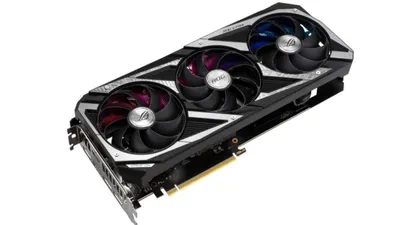
On the other hand, for a discrete GPU (dGPU)—like the one found on a graphics card installed in a custom PC—power consumption varies widely depending on the graphics chip used on the board.
|Graphics card|TDP| |:---:|:---:|:---:| |GeForce GTX TITAN Z|375| |Radeon RX Vega 64|295| |GeForce RTX 2080 Ti|250| |GeForce GTX 1080 Ti|250| |GeForce GTX 980 Ti|250| |Radeon RX 5700 XT|225| |Radeon RX 590|225| |GeForce RTX 2080|215| |GeForce RTX 2070 SUPER|215| |Radeon RX Vega 56|210| |Radeon RX 580|185| |Radeon RX 5700|180| |GeForce GTX 1080|180| |GeForce GTX 1070 Ti|180| |GeForce RTX 2060 SUPER|175| |GeForce RTX 2070|175| |Radeon R9 Nano|175| |Radeon R9 380X|175| |Radeon R9 270|175| |GeForce GTX 980|165| |GeForce RTX 2060|160| |Radeon RX 5600 XT (14Gbps)|150| |Radeon RX 5600 XT (12Gbps)|150| |Radeon RX 5600|150| |GeForce GTX 1070|150| |Radeon RX 570 8GB|150| |GeForce GTX 970|145| |Radeon RX 5500 XT 8GB|130| |Radeon RX 5500 XT 4GB|130| |GeForce GTX 1660 SUPER|125| |GeForce GTX 1660 Ti|120| |GeForce GTX 1660|120| |GeForce GTX 1060 6GB|120| |GeForce GTX 1060 3GB|120| |GeForce GTX 960|120| |GeForce GTX 1650 SUPER|100| |GeForce GTX 950|90| |Radeon RX 560|80| |GeForce GTX 1650 GDDR6|75| |GeForce GTX 1650|75| |GeForce GTX 1050 Ti|75| |GeForce GTX 1050|75|
TDP stands for Thermal Design Power, which is the “heat output value” a chipset is designed for—it is not the same as pure power consumption. However, since actual peak power draw is often said to be roughly 1.3 to 1.5 times the TDP, TDP can still be used to estimate maximum power consumption.
Based on that assumption, unless it’s a low-power model like the GeForce GTX 1650 series, many discrete GPUs can draw 150W+ from the graphics card alone, and higher-end GPUs may draw 250W+ at peak. That’s several times higher than what a typical CPU might draw at maximum.
Why It Helps to Know GPU TDP
For a custom PC build, required power can be estimated
Using the rule of thumb that “a GPU may draw 1.3–1.5× its TDP,” it becomes possible to estimate what wattage power supply unit (PSU) should be chosen for a GPU upgrade.
For example, if the CPU is rated at 65W TDP and the GPU is rated at 150W TDP, then “a 400W PSU at minimum, and ideally a 550W-class PSU” would be a reasonable guideline. This is a particularly important indicator for custom PCs, where power planning and management are also part of the build.
Electricity costs can be roughly estimated from usage time
As shown above, a PC with a discrete GPU (dGPU) can consume several times more power than a typical laptop.
A gaming PC used for about an hour on weekends is rarely an issue, but if it’s a main PC used for hours every day, the difference in power draw directly shows up on the electricity bill. It’s reasonable to think of “a high-spec PC = a power-hungry machine.”
For example, if a machine with a combined TDP of around 500W is used during the summer, its maximum power draw would be roughly “like running one more air conditioner.” If “time with the AC on = time the high-spec PC is running,” the summer electricity bill could potentially double compared to a normal year.
That said, this assumes the system is “always running at max power,” so in reality it’s rare for the electricity bill to become “twice the cost of running an air conditioner.”
So far, GPU (graphics card) types and power consumption have been covered.
For prebuilt PCs, it usually isn’t something to worry about too much, but with a custom PC build, it’s necessary to buy a PSU as well. If planning to install a dGPU for a gaming PC or similar build, it’s best to choose a PSU with a larger capacity whenever possible.