What Is a NUC?
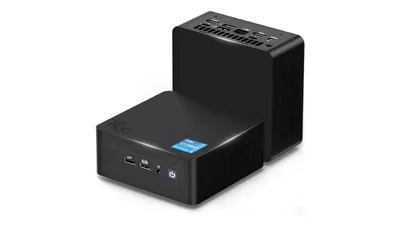
NUC is short for “Next Unit of Computing,” a compact PC form factor (standard) originally proposed by Intel. Because the chassis is extremely small, it doesn’t take up much desk space, and it can also be mounted to the VESA mount on the back of a TV or monitor.
Prebuilt NUC vs. Barebones NUC
NUCs sold on the market generally fall into two categories:
- Prebuilt NUC
- Barebones NUC (you assemble only some parts)
A prebuilt NUC is exactly what it sounds like: buy it, power it on, and use it immediately. It’s sold with everything already installed—such as the OS, memory, and storage—so in that sense, it’s similar to a typical prebuilt PC.
In some cases, the manufacturer sells it as a prebuilt unit, and in other cases, a PC shop adds the required parts to a barebones NUC and sells it as a “prebuilt NUC.”
A barebones NUC, on the other hand, is sold without certain parts and/or the OS. Typically, it comes as a set that includes:
- CPU
- Motherboard
- Power (AC adapter)
- Wi‑Fi/Bluetooth card
- Case
Then you provide:
- Memory
- Storage
- OS
After installing the parts and setting up the OS, it’s ready to use.
If you compare what you need to provide yourself, it looks like this:
| Part | DIY PC | Prebuilt NUC | Barebones NUC |
|---|---|---|---|
| CPU | Yes | — | — |
| Motherboard | Yes | — | — |
| Memory | Yes | — | Yes |
| Storage | Yes | — | Yes |
| Wi‑Fi | Yes | — | — |
| Bluetooth | Yes | — | — |
| Power supply | Yes | — | — |
| Case | Yes | — | — |
| OS | Yes | — | Yes |
Since buying a NUC covers most of the parts you’d normally need for a DIY PC, it’s incredibly simple.
Why NUCs Are Great for Beginners
Assembly is dramatically easier
With a DIY PC, you need to worry about part compatibility and physically installing components like the CPU. Without any prior knowledge, you’ll end up researching as you build, which can take a surprising amount of time and effort.
With a barebones NUC, you mostly install just memory and storage, then install the OS and you’re done. Even if compatibility issues happen, they’re limited to memory and storage—so the chances of running into trouble are much lower.
Intel NUCs come with strong support
With a DIY PC, BIOS and driver installs/updates are entirely on you—and that’s often one of the first major hurdles for beginners.
With smaller parts brands, BIOS and driver updates may be infrequent. In some cases, OS updates (like Windows updates) can outpace driver support, leading to driver issues that prevent the PC from running properly.
However, with an Intel barebones NUC, you can generally expect longer-term support for driver and BIOS updates—something Intel is well positioned to provide.
For example, the Intel NUC DN2820FYK (which the author uses as a home server) was released in January 2014, but as of August 2020 its latest BIOS update was released on June 9, 2020. It’s great to see support continue even more than six years after launch.
Also, because Intel NUCs have users worldwide, the user community is large—and it’s nice that a quick search online usually turns up helpful information.
Strong resale value
Intel NUCs have steady demand, so when you start with a barebones NUC and later decide, “Now I want to build a full DIY PC,” you can often resell the barebones components (everything except memory, storage, and the OS) for a good price on auction sites or marketplace apps.
As a rough rule of thumb, even after two to three years, it often doesn’t drop below 50% of the original purchase price. So if a barebones NUC purchased for about $375 sells for about $190, that can significantly reduce the cost of your next DIY PC build.
For experienced builders, a NUC can feel like it’s missing some of the “fun” of building a PC. But for beginners, it’s an easy way to get started—and because it holds its value well, it also makes it easier to take the next step later.
If you’re thinking about building your first PC, it’s definitely worth considering.