Benefits of Choosing an Intel NUC
You can build a PC “like a model kit” with almost no DIY knowledge
Intel NUC is a barebones PC built around the idea that “it runs as long as you add memory, storage, and an OS,” so assembly is extremely simple.
At the store, just buy NUC-compatible memory and storage based on the staff recommendation, then at home install the parts as described in the manual and install the OS—you can start using it right away. In some cases, it can be a fully working PC within 30 minutes of starting. That’s genuinely innovative, both as a home PC and as a barebones PC.
And you still end up with a DIY-built PC that’s ultra-compact and doesn’t look bad, which makes it a great fit both for first-time builders and for experienced builders who want a small “extra” PC.
Long-term BIOS and driver support
With DIY PCs, keeping drivers and motherboard BIOS up to date can be a headache. With an Intel NUC, that’s far less of a concern—some existing Intel NUC models have received updates for as long as six years.
Extremely power-efficient
One downside of DIY PCs is that power consumption can be surprisingly high. If it’s used for about an hour a day, it may not matter much, but for an everyday PC used for several hours daily, the electricity cost adds up.
Many Intel NUC models are based on 15W TDP parts, and some models even use 6W TDP components, making them highly power-efficient. That makes them ideal for always-on use cases like media players or living-room/TV PCs.
The value isn’t bad
Intel NUC’s mainline Core i5 models cost roughly around about $374 for the barebones unit. As barebones PCs go, that’s on the expensive side.
However, considering that it includes:
- CPU
- Motherboard
- Wi‑Fi / Bluetooth module
- Power (AC adapter)
- Case
…it’s not necessarily a bad deal. If you tried to buy these as “standard DIY PC parts,” the total would likely end up surprisingly close.
Intel NUCs are still expensive in terms of raw performance per dollar, but when factoring in maintainability—like BIOS and driver support—it’s fair to say the value “isn’t bad.”
Drawbacks of Choosing an Intel NUC
You can’t choose the CPU (and it’s basically a laptop-class CPU)
On every Intel NUC model, the CPU is soldered directly to the motherboard. In other words, users can’t replace the CPU.
As a result, Intel typically releases multiple same-generation models that differ by CPU, but because the chassis is ultra-compact, the standard approach is to use low-TDP, laptop-class CPUs.
Some laptop CPUs today can outperform desktop CPUs from a few generations ago. Still, in an era where 8-core and 16-core DIY builds are common, it can feel a bit underwhelming that many NUC CPUs top out at around 4 cores.
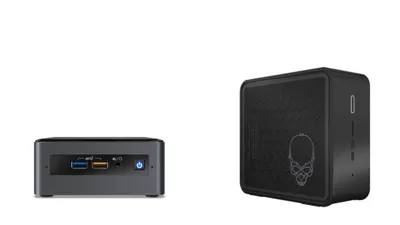
To address that demand, Intel released models like the NUC9i9QNX with an 8-core / 16-thread Intel Core i9-9980HK—but the street price is around about $1,590. With a Mini-ITX Ryzen build, it’s possible to build a system with a dedicated GPU for about $940, so the value isn’t great.
You can’t choose the CPU cooler/fan
A surprisingly common complaint in Intel NUC reviews is fan noise.
Intel NUC looks like an ultra-compact desktop, but inside it’s closer to a laptop. That means if it uses a laptop CPU, it also uses a laptop-class CPU fan.
So when you run a sustained heavy workload, the CPU fan can ramp to full speed and produce a loud, high-pitched whine continuously. If you’re building it as a “small everyday PC that blends into your desk,” that can get pretty unpleasant—despite its small size, it makes its presence known through noise.
With a Mini-ITX form factor PC, you have options: install a high-performance, low-noise desktop CPU cooler, add case fans to improve airflow, or even build in a compact liquid cooler. Intel NUC doesn’t offer that kind of customization, which is a major downside.
Limited expandability
Not being able to choose the CPU or fan is one thing, but Intel NUC also has limited expandability in general.
Since users can mostly only choose memory and storage, key DIY PC strengths—like adding a dedicated GPU or installing multiple SSDs—are severely restricted.
Some newer Intel NUC models include USB‑C ports that support Thunderbolt 3, which makes an eGPU (external GPU) an option and enables higher-performance expansion. However, once you add the GPU and the eGPU enclosure, the cost can approach about $940—enough to buy roughly two more Intel NUC units. At that point, it’s hard to see a strong reason to stick with an Intel NUC.
If you don’t absolutely need NUC-level compactness, choosing a Mini-ITX case is likely the better option for long-term use.
That covers the pros and cons of choosing an Intel NUC.
Intel NUC is a highly compelling product. The author is one of the users who got hooked on Intel NUC—after building DIY PCs for over 10 years, the only DIY-built PC they’ve used continuously for more than five years is an Intel NUC.
That said, while it can be a great mini PC for many people, as a DIY barebones platform it’s also a “not for everyone” option—so before buying, make sure it actually fits your intended use.